Health Check · Broken references
Find every link in a Storyline course
Drop in a .story file and get every web address and file link in the course: text hyperlinks, Open URL/File triggers and links in the player’s Resources tab, each with the slide and object it’s on.
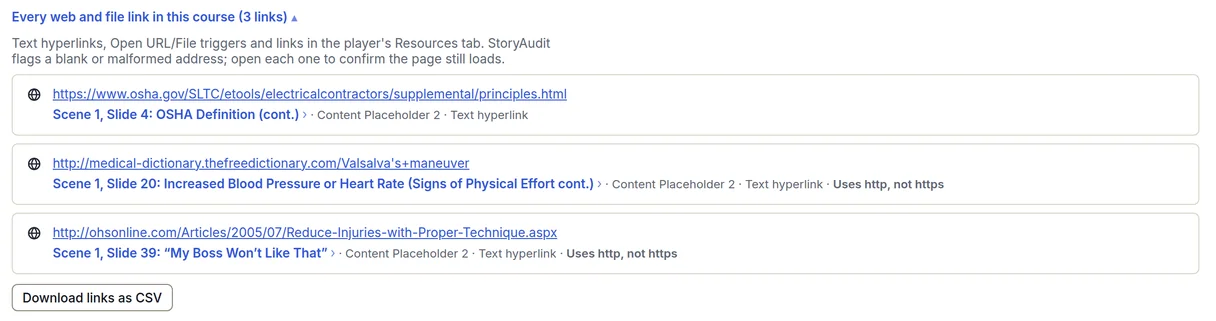
The demo course has 3 text hyperlinks and opens with no signup.
What the list shows
- Every text hyperlink and Open URL/File trigger, on slides, layers, layouts and masters
- Web links in the player’s Resources tab
- The slide and object each link is on, with a jump to that slide in Course Docs
- A Health Check finding for any text hyperlink or Open URL/File trigger left blank or with an address that can’t work as written
- A note on each link that still uses http instead of https
- The whole list as a CSV: one row per link, with the slide, object, kind and address
Storyline doesn’t have a built-in list of a project’s hyperlinks, so checking them usually means clicking through the published course. StoryAudit reads every link straight from the .story file, so the course doesn’t need to be published or opened in Storyline first.
What StoryAudit checks, and what it leaves to you
- Flagged: a text hyperlink or trigger with no address, and an address that can’t work as written, such as one with a space in it or no domain.
- Left to you: whether the page still exists. Every web address in the list is a real link, so each one opens in a new tab to check.
When a link list helps
- An annual review or recertification of a course that cites outside sources
- A site the course links to has moved or changed its addresses
- Sending an SME or a legal reviewer every outside source the course points to
- A security or IT review that asks for every external address a course opens
How it works
- 1Open StoryAudit and drop in your .story file.
- 2In Health Check, open Broken references.
- 3Open “Every web and file link in this course”, then download the list as a CSV.
For a whole folder of Storyline courses, Batch Check’s content search finds a web address in every course at once, and Download every link puts the links from every course checked in the sweep in one CSV.
Health Check runs free on your own .story file too, with no account. Downloading the CSV from your own file needs a free trial.