Course Docs · Media
Export all the audio from a Storyline course
Drop in a .story file and download every narration clip and sound as one zip, with the names shown in Storyline’s media library. Pictures and video come out the same way. It runs in your browser, so the course never leaves your computer.
The sample course has 35 audio files. No signup.
What you can download
- Every audio file in the course, in one zip
- A zip of every picture, or of every video
- All of the course's media in one zip
- An asset pack: all the media plus a manifest.csv listing each file's kind, the slides it's used on, and its alt text or captions
- Captions as standard .vtt files
- A media list as a CSV: every file, its size and the slides it's on
Storyline 360 can also export selected media from its Media Library when the project is open in Storyline. StoryAudit works on any .story file, from Storyline 2, 3 or 360, in a browser, and adds the slide list, the captions and the manifest.
How the files are named
Inside a .story file, media is stored under internal names like R64yLZQ0Evph.mp3. The download uses the name shown in Storyline’s media library instead, such as track302.mp3 or spine alignment.png. A file Storyline never kept a name for keeps its internal name, and the media list shows which slide it belongs to.
Inside the .story fileIn your download
R64yLZQ0Evph.mp3→track256.mp3R5nJxuDxM4yo.mp3→track257.mp3R5kJAI43jwVr.mp3→track258.mp3
When the audio helps
- Re-recording narration, or sending the script and the takes to a voice artist
- Translation and localization, where every clip is replaced slide by slide
- Checking audio quality and levels outside Storyline
- A licensing or clearance review of the media a course uses
How it works
- 1Open StoryAudit and drop in your .story file.
- 2Go to Course Docs and open the Media view.
- 3In Media asset inventory, open the Export menu and choose the audio download, or the asset pack for everything plus the manifest.
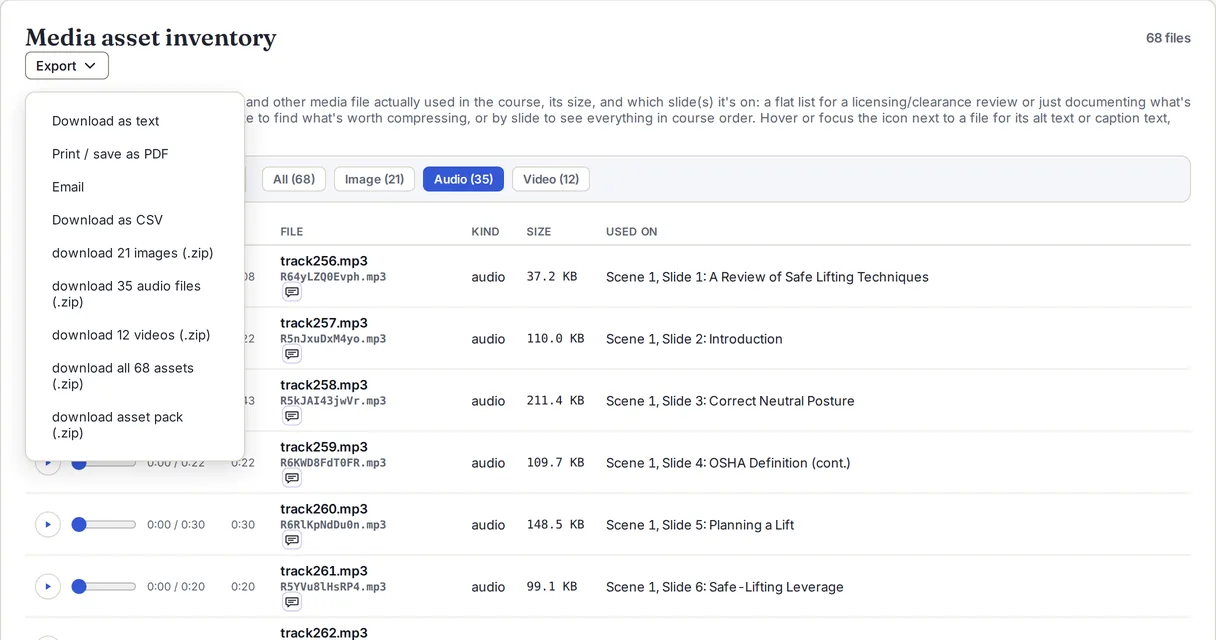
The demo course has 35 audio files, 21 pictures and 12 videos, and every download works on it with no signup.
StoryAudit is not affiliated with or endorsed by Articulate Global, LLC. Articulate and Storyline are trademarks of Articulate Global, LLC.